Konnet Core · Step by step

How your system learns
to talk to AI

No jargon: what an API is, what an MCP is, and the real journey through the Konnet assistant - with product screens - from your documentation to an AI agent able to work with your system. In about 5 minutes.

The analogy that explains it all

Imagine the AI wants to make a pizza

Your company already has everything it needs. The problem was never the ingredients: it was the language.

The pizza analogy: on the left the loose ingredients representing the API, in the center the blue restaurant menu representing the MCP, and on the right the served pizza representing what the AI agent achieves
The loose ingredients (your API) · the restaurant menu (the MCP) · the served pizza (what your agent achieves)

The API: the loose ingredients

Your system - the ERP, the CRM, the billing - has everything: customers, balances, orders, appointments. But loose, each thing in its own jar with a technical label. That is an API: the ingredients are there, even if only a technician knows how to cook them.

The MCP: the restaurant menu

Konnet takes those ingredients and builds a menu in the language AI agents understand: which dishes exist (what can be queried or done), what goes into each one, and how to order it. The agent no longer guesses: it orders from the menu.

The agent: actually cooks

With the menu in hand, the AI agent can operate your system and consume it optimally: it checks a balance, books an appointment, triggers a collection. AI that only chats reads recipes; AI connected to your company cooks.

The real journey, with product screens

Six guided steps: from your documentation to the agent

This is the real Konnet assistant. The wizard itself marks the path: Connection → Menu → Access → Test → Agents → Done.

Step 1 · Connection

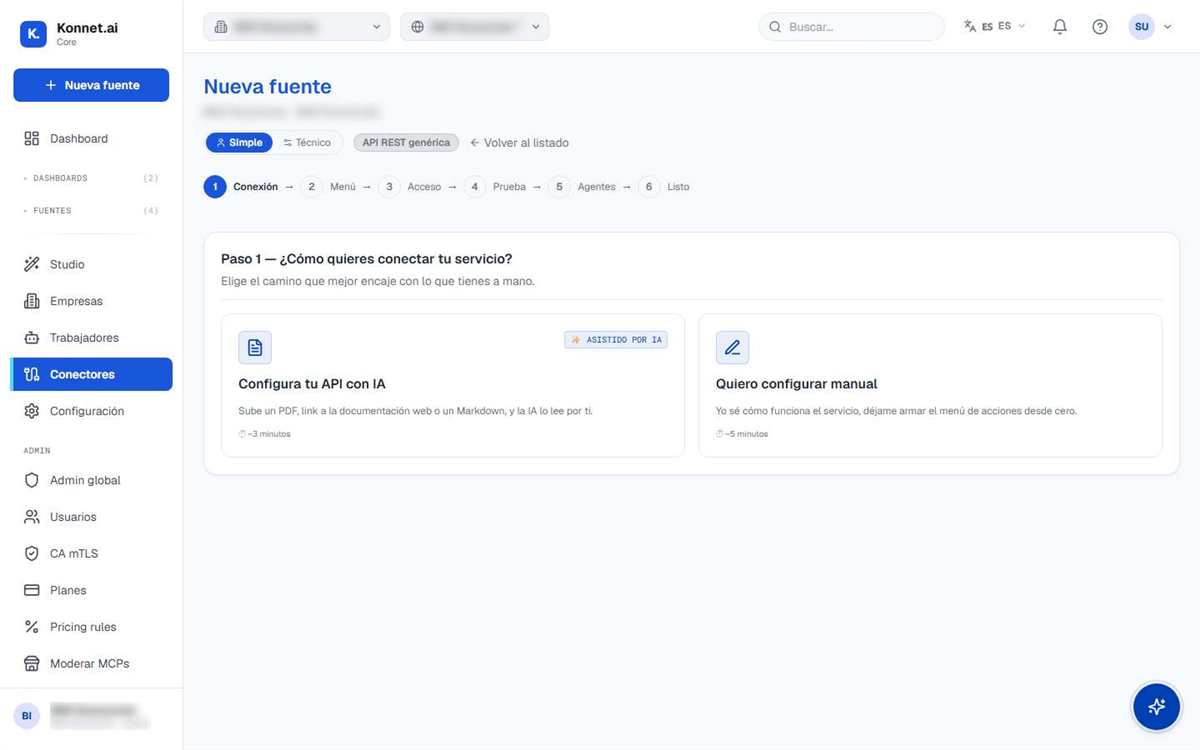
Hand over the recipe: the AI reads it for you

Upload a PDF, the link to your API's web documentation, or a file from your provider. You do not need to understand it: the assistant reads it and detects what can be queried and done. It takes about 3 minutes.

app.konnet.ai / integrations / new
Konnet Core assistant: Connection step with the Set up your API with AI option, uploading the documentation
Steps 2 to 4 · Menu, access, and test

Konnet builds the menu and tests it live

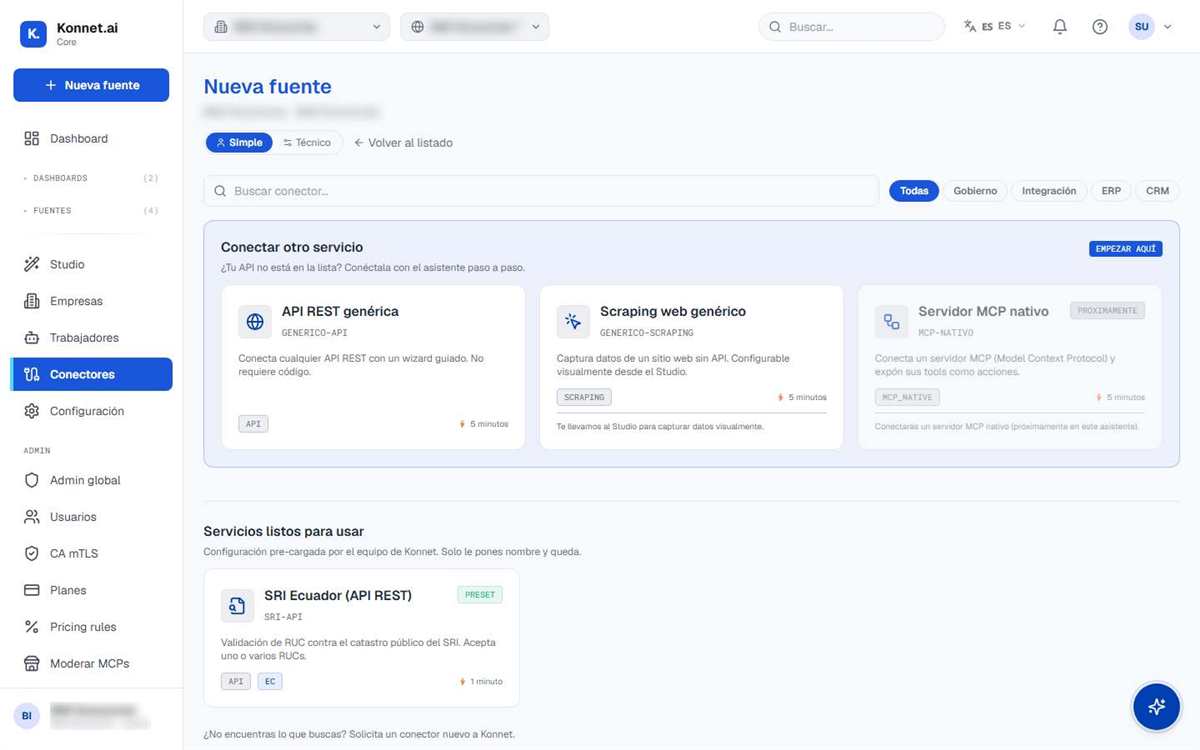
The assistant proposes your system's menu of actions; you enter the credentials (stored encrypted) and a test query confirms the data arrives. You can also start from a ready-to-use connector.

app.konnet.ai / integrations / new
Konnet Core connector catalog: generic REST API, web scraping, and ready-to-use services
Steps 5 and 6 · Agents and done

Publish the menu for your AI agents

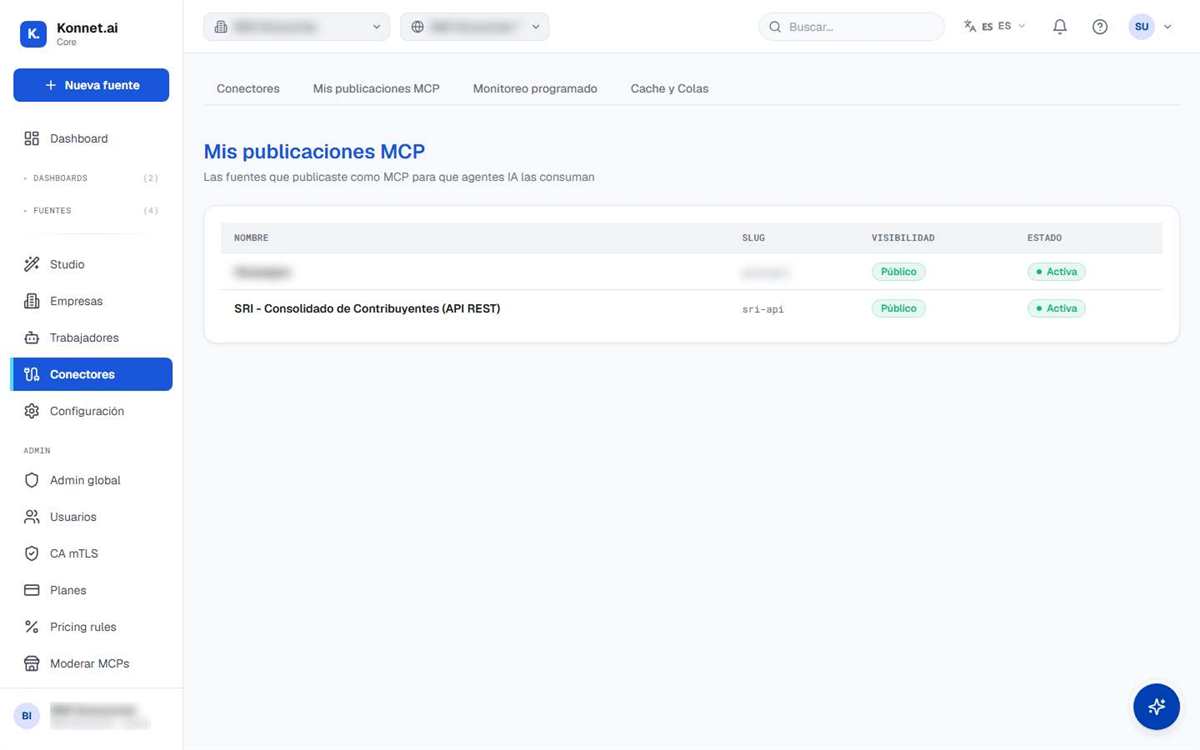
With one click, the source is published as an MCP server: the menu becomes available to agents, and you decide what each one can see and manage. From that moment on, your system feeds dashboards, flows, and agents.

app.konnet.ai / connectors / publications
Konnet's My MCP publications screen: sources published for AI agents to consume, active and with controlled visibility
What is this good for?

AI that does not just chat: it executes with your systems

Your ERP answers the agent

"How much does this customer owe us?" stops being a manual lookup: the agent queries the system and answers with the real figure, instantly.

Data triggers actions

A delinquency traffic light that changes can trigger the WhatsApp payment reminder with Konnet Flow - without anyone having to look at the report first.

Reports build themselves

Dashboards are generated by AI on live data that updates on its own: you open the panel and see today's status, not the last Excel file's.

Frequently asked questions

Frequently asked questions

What is an API, explained without jargon?

An API is the way a system delivers its data and actions to other programs. Think of the ingredients of a pizza: your system has everything you need - customers, balances, orders, appointments - but loose, each thing in its own jar with a technical label. The value is right there, even though nobody non-technical can cook it directly.

What is an MCP and what is it for?

MCP (Model Context Protocol) is the standard AI agents use to connect to systems. Following the analogy: if the API is the loose ingredients, the MCP is the restaurant menu - it takes those ingredients and presents them in a language the AI agent understands: which dishes exist, what goes into each one, and how to order them. That way the agent does not guess: it checks the menu, orders correctly, and your system responds optimally.

What if my system does not have an API?

Most modern systems (ERP, CRM, billing, e-commerce) have an API even if you have never used it; asking your provider for the documentation is usually enough. If your system does not have one, there are alternatives - web portals and other sources - which we evaluate in the demo to find the best path.

Do I need programmers to connect my system?

Not to connect it: the Konnet assistant reads the documentation for you and builds the configuration; you just review and approve. A process that takes 2 weeks to 2 months of development in a traditional integration is resolved in about 5 minutes, and your credentials are stored encrypted from the very first step.

What if my API documentation is incomplete?

The assistant resolves the integration with whatever exists: it reads OpenAPI or Postman documentation, links from your provider's portal, and even rendered pages, and when something is missing it searches the web with AI. If information is still lacking, the assistant says so honestly - it never makes things up - and tells you exactly what to ask your provider for. With that specific piece of data, the connection is completed in the same session.

How many systems can I connect?

As many as you need: every new source is configuration, not a development project. You can connect your ERP, your CRM, billing, your e-commerce, and your industry's public sources, and they all enter the same pipeline: they feed dashboards, trigger alerts, and become available to your agents via MCP. The system grows by loading data sources, not by writing new code, so source number twenty costs the same as the first one.

Is MCP an open standard?

Yes. MCP (Model Context Protocol) is an open industry standard that defines how AI agents connect to tools and data; the leading AI providers use it. By publishing your sources as MCP servers with Konnet, your systems are ready to talk to the agents you already use or the ones you adopt tomorrow, without being locked into a single provider: the menu is written in a language every agent understands.

How do I control the agent's permissions?

In the assistant's Agents step you decide everything: whether the source is published as MCP or not, which tools are exposed (read-only or actions too), and which credential each agent uses. Every agent query is logged, personal data is filtered out where appropriate, and you can pause or revoke access at any time. The agent cooks with your menu, but the kitchen - and the keys - remain yours.


Bring your API to the demo and leave with it connected

Live, with your real documentation: the assistant reads it, builds the menu, and your system ends up talking to AI.

Book a demo